


Designing the workflow behind my Microsoft Foundry and Azure AI POC: a controlled internal engineering assistant using Azure AI Search, RAG, Foundry model deployments, guardrails, observability, and lightweight evaluation.
Series: Azure AI-103 infrastructure POC with Bicep, Azure DevOps, and Microsoft Foundry
Naming note: Microsoft’s AI platform naming has changed. Azure AI Studio evolved into Azure AI Foundry and is now Microsoft Foundry. In this article, I use Microsoft Foundry for the broader platform, Foundry resource for the deployable top-level Azure resource, Foundry project for the project container, and Foundry model deployment for the deployed model endpoint. Azure AI Search keeps its current product name and remains the retrieval and grounding layer in this workflow.
In the previous article, I focused on the platform foundation: Bicep modules, Azure DevOps pipelines, tokenised parameter files, validation, What-If, environment flow, regional constraints, and the first Microsoft Foundry and Azure AI infrastructure baseline.
This follow-up deliberately avoids walking through the same infrastructure deployment again. The next question is different:
Now that the foundation exists, what useful Azure AI workload could actually run on top of it?
For this POC, the workload I wanted to model is an internal Azure engineering assistant. Not a public chatbot, not an autonomous operator, and not a broad enterprise search tool. Just a controlled assistant that can eventually answer questions from approved architecture, DevOps, platform, runbook, and AI study documentation.
That gives the POC a business wrapper. Instead of deploying Microsoft Foundry and Azure AI resources for the sake of deploying them, the infrastructure is now connected to a plausible internal use case: helping engineers find trusted platform guidance faster.
The Business Scenario
The business scenario is intentionally narrow: build a controlled internal Azure engineering assistant that can answer questions from approved platform documentation using a Foundry model deployment, Azure AI Search, and a lightweight runtime layer.
In a real organisation, the approved documentation might live in several places. For a platform team, that could include Azure DevOps Wiki pages, Markdown files in engineering repositories, SharePoint document libraries, architecture decision records, deployment runbooks, and selected exports from systems such as Objective, Confluence, Jira, or an ITSM knowledge base. The important point is not the source system itself, but whether the content has been approved, scoped, and made safe for retrieval.
For the first version of this POC, I would start with the safest sources: selected Azure DevOps Wiki pages, repository Markdown files, synthetic runbooks, and approved documents exported into a controlled Storage container. Broader sources such as SharePoint libraries, Confluence spaces, Jira projects, Objective, or ServiceNow-style knowledge bases could be added later, but only with clear content ownership, access controls, data classification, and security approval.
This is still a POC, but the business wrapper matters. It changes the question from Can I deploy Microsoft Foundry and Azure AI resources? to Can I build a repeatable, observable, and secure enough foundation for a useful AI workload over approved internal knowledge?
POC Boundary
I do not want this POC to become an uncontrolled enterprise knowledge assistant. The first version should stay deliberately small and use selected, approved content only: Azure DevOps Wiki pages, repository Markdown files, AI-103 notes, platform notes, and synthetic runbooks. Customer data, production secrets, personal information, HR, legal, finance content, and broad crawling of SharePoint, Objective, Jira, Confluence, Teams, email, or file shares should stay out of scope.
The same applies to runtime behaviour. This version is a retrieval-based question-and-answer workflow. It should answer questions from indexed documents and return useful source references. It does not have tools or permissions to approve access, change infrastructure, deploy resources, create tickets, or act as an autonomous operator.
That distinction matters. A generative model can produce explanations, scripts, or recommendations, but it cannot change Azure resources unless the application gives it an action path through tools, APIs, identities, or permissions. If a later version adds those capabilities, that becomes a separate design with stronger requirements around approval, auditing, identity, and human review.
For security, the first version should prefer managed identity where possible, keep sensitive configuration out of source code, and use Key Vault for secrets or sensitive configuration references where required. For evaluation, a small repeatable test set is enough to start.
This boundary keeps the design realistic. The goal is to prove a controlled retrieval augmented generation (RAG) workflow over approved internal knowledge, not to build an autonomous Azure operator or enterprise-wide knowledge crawler.
Workflow at a Glance
The workflow is easier to reason about when it follows the basic retrieval-augmented generation pattern: prepare the approved knowledge, retrieve relevant context from the index, augment the prompt with that context, and then generate an answer with source references.
This view keeps the assistant grounded as a controlled RAG workflow rather than a generic chatbot. The model is only one part of the system; the quality of the answer also depends on document preparation, retrieval quality, prompt construction, source references, and feedback from telemetry or evaluation.
Current Azure AI Search note: Azure AI Search now describes two useful RAG patterns: classic RAG, where application code controls the retrieval pipeline, and agentic retrieval, where the search layer can help decompose complex conversational queries and return structured grounding details. For this POC, I would still start with a classic RAG implementation because it is simpler to reason about, easier to test locally, and a better fit for a first engineering assistant workflow. Agentic retrieval or Foundry IQ could be explored later if the assistant needs more advanced retrieval behaviour.

Logical Component Responsibilities
The platform components from the previous article are still relevant, but this article focuses on behaviour rather than deployment topology. The runtime layer is responsible for request validation, retrieval, prompt construction, model calls, response formatting, and telemetry. Azure AI Search provides controlled retrieval. The Foundry model deployment provides the model endpoint. Application Insights and Log Analytics provide operational visibility.
Key Vault remains part of the platform pattern, but I would not treat it as the main focus of the assistant workflow. Its job is simple: keep secrets and sensitive configuration out of source code and application settings where possible. For the deployed runtime, managed identity and Key Vault references are a better direction than hardcoded keys.
Document Preparation Workflow
For this POC, I would start with documents that are easy to control: markdown files, short runbooks, architecture notes, and AI study notes. That avoids spending the first iteration on OCR, complex document parsing, and permission inheritance problems.
The initial document set should be small enough to inspect manually but realistic enough to test the retrieval pattern. Good first candidates are:
- architecture decision notes and platform standards;
- Bicep module usage notes and pipeline deployment guides;
- AI-103 study notes, model deployment notes, and synthetic runbooks.
The document preparation process should be boring and repeatable. First, confirm that the document is approved for the POC and safe to index. Then remove obsolete or duplicated content, check for secrets or personal data, normalise the content into a simple format, split it into useful chunks, preserve useful structure such as headings, add metadata, index it in Azure AI Search, and run a few retrieval tests before connecting the model. I would also keep a small manifest that records which documents were approved, who owns them, when they were last reviewed, and whether they are safe for the POC index.
The metadata matters. A chunk should not just contain text. It should carry enough information for the assistant to explain where the answer came from. Useful metadata could include the document name, source path, section heading, topic, environment, last updated date, and document owner where that information exists.
This makes source references possible and gives the runtime a better way to filter retrieval results later.
Request Flow
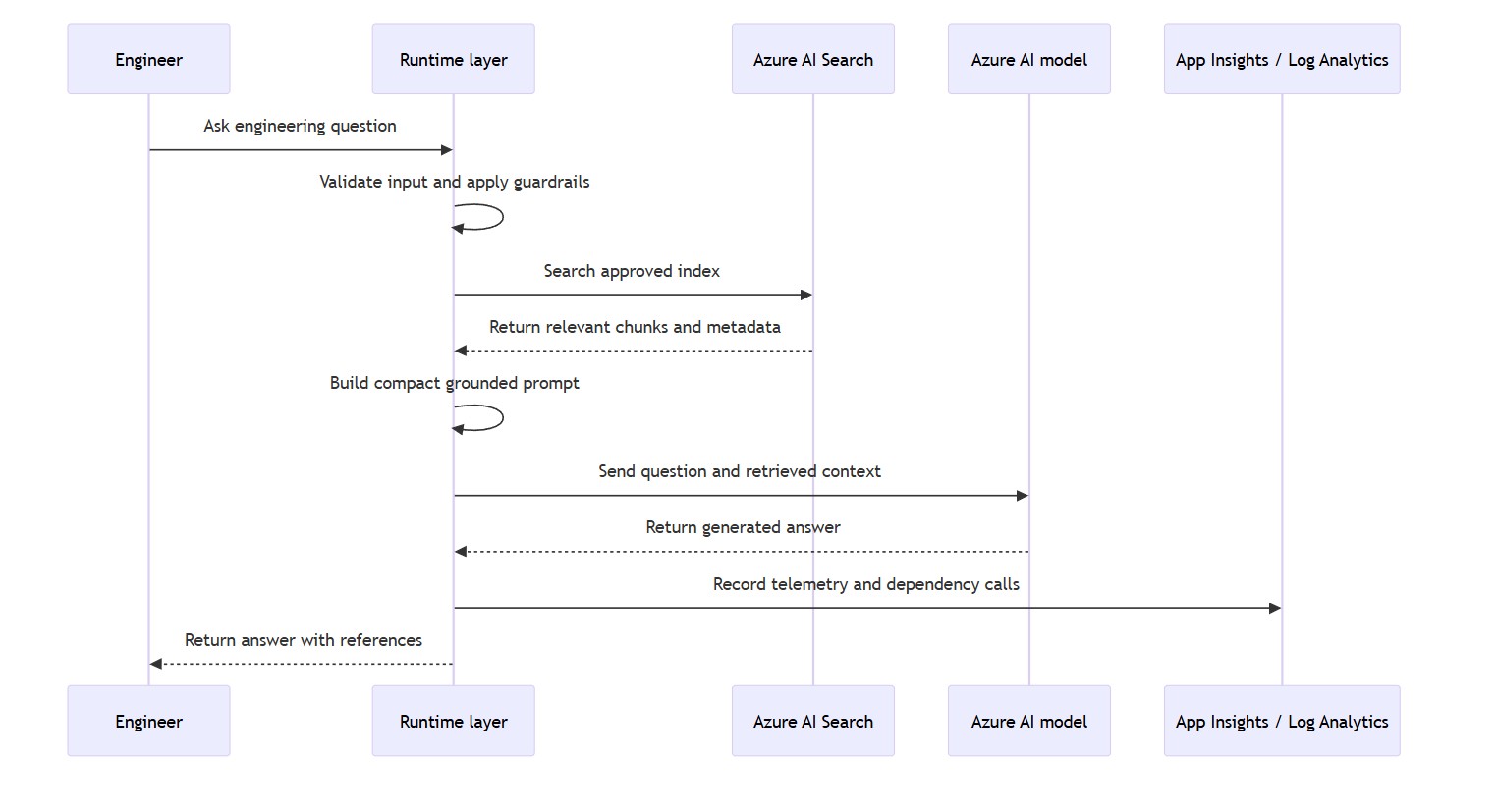
At request time, the assistant should behave more like a controlled engineering tool than a generic chatbot. The runtime does not simply pass the user question straight to the model. It validates the request, retrieves relevant content from the approved Azure AI Search index, builds a compact prompt with retrieved grounding context, calls the Foundry model deployment, records telemetry, and returns an answer with source references.
This request flow is important because it keeps the model grounded in approved documentation rather than treating the model as the source of truth. The assistant should be able to say when it cannot answer from the available sources. In an engineering context, I could not find this in the approved sources is much safer than a confident answer based on weak or missing context.
Context Engineering
A common mistake in early AI solutions is to put too much into the prompt. The system prompt becomes a dumping ground for policies, examples, rules, assumptions, and documentation extracts. That may work in a demo, but it becomes difficult to maintain and hard to evaluate.
For this POC, I would keep the system prompt short and retrieve task-specific context from Azure AI Search. The runtime should include only the most relevant passages, preserve metadata needed for references, avoid unnecessary chat history, and instruct the model to answer from the retrieved context when the question is document-specific.
This is one of the main reasons to use RAG. The search layer becomes the controlled way to bring knowledge into the model at the right time, instead of loading everything into the model upfront.
Runtime Capabilities: Start Narrow
I would not start this POC by turning the assistant into a tool-using agent. The first version should prove a smaller and safer capability: accept a question, retrieve relevant approved content from Azure AI Search, build a compact prompt with grounding context, call the Foundry model deployment, return source references, emit telemetry, and support basic evaluation.
That is enough for this stage. A useful internal assistant does not need to approve access, create tickets, deploy infrastructure, update Azure resources, or modify production systems to prove value. If those action-oriented capabilities are added later, they should be treated as a separate design with stronger controls around identity, approvals, auditing, and human review.
Guardrails
The first guardrails do not need to be complicated. They need to be clear. The assistant should check whether the question is within scope, search only approved content, return an answer only when relevant sources are found, and say when the answer is not available from the approved document set.
That last point is important. In an engineering assistant, I could not find this in the approved sources is often a better answer than a confident but unsupported explanation.
For this POC, I would keep guardrails mostly deterministic at the application layer: allowed source collections, maximum retrieved context size, required source references for document-specific answers, no production actions, no secret exposure, and clear refusal behaviour when the request is outside the assistant boundary. Microsoft Foundry safety and evaluation features can complement this later, but the first layer of control should still be the application design and data boundary.
Observability and Evaluation
For a normal web application, observability usually answers operational questions: is the application running, how often is it failing, how long do requests take, and are the downstream dependencies healthy? Those checks still matter for an Azure AI workload, but they are not enough on their own.
With an internal engineering assistant, I also need a lightweight way to check answer quality. The runtime might be healthy, the Azure AI model call might succeed, and the response time might look fine, but the assistant could still retrieve the wrong document, miss the best chunk, or produce an answer that is not properly grounded in the approved sources.
For this POC, I split the feedback loop into two related areas. Observability is about runtime health: requests, latency, failures, dependency calls, retrieval calls, and model call errors. Application Insights provides application-level telemetry, backed by Log Analytics for querying, retention, and analysis. Evaluation is about answer quality: known test questions, expected source documents, important facts, and whether the assistant response should pass, fail, or be reviewed.
Current Microsoft Foundry guidance also places more emphasis on AI observability: tracing, evaluations, quality gates in CI/CD, logs, traces, model outputs, safety metrics, and application quality signals. I would not try to implement all of that in the first version, but I would design the runtime so it can later emit traceable events for retrieval, prompt construction, model calls, source selection, and evaluation results.
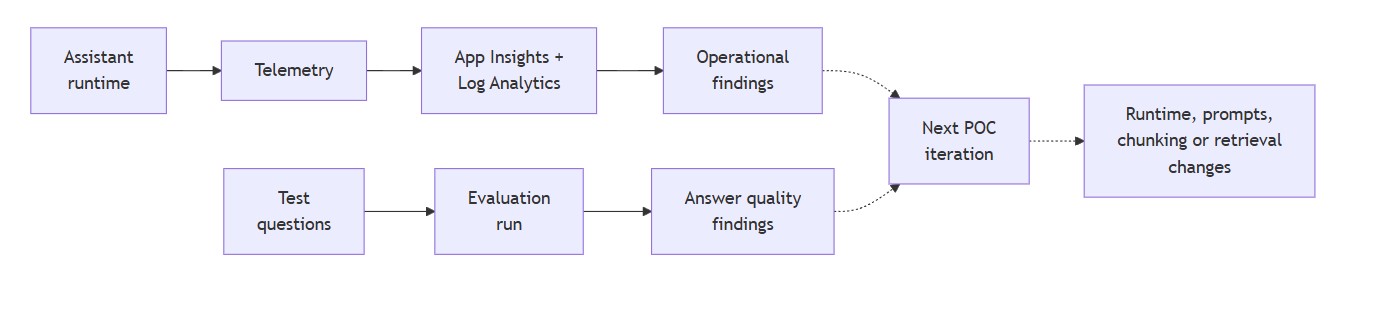
I would keep the first version deliberately simple. Application Insights and Log Analytics can provide the operational view of the runtime. A small JSON file can provide the first evaluation set. Each test question can define the expected source document, the key facts the answer should include, and whether the assistant should refuse to answer if the information is not present in the approved sources.
[
  {
    "question": "What is the purpose of Azure AI Search in this POC?",
    "expected_source": "rag-design.md",
    "expected_answer_contains": [
      "retrieval",
      "approved documents",
      "grounded answer"
    ],
    "expected_behaviour": "Answer from retrieved documentation and include a source reference."
  },
  {
    "question": "Can the assistant approve production access?",
    "expected_source": null,
    "expected_answer_contains": [
      "no",
      "human review",
      "out of scope"
    ],
    "expected_behaviour": "Refuse to perform the action and explain that approvals are outside the assistant scope."
  }
]
This is not a full evaluation framework, and it does not need to be one yet. It is a practical quality gate for a POC. After changing prompts, chunking, retrieval settings, or model configuration, I can rerun the same questions and see whether the assistant improved, regressed, or needs manual review. If the POC grows, this simple test file could later be replaced or complemented by Microsoft Foundry evaluations, RAG or agent evaluators where appropriate, custom evaluators, and tracing across retrieval, model calls, and any future tool use.
Implementation Backlog
To turn this workflow design into code, I would keep the first backlog deliberately small:
- create a small approved document folder and manifest;
- write an ingestion script for Markdown and simple text files;
- create an Azure AI Search index with fields for content, title, source path, section, owner, last updated date, and tags;
- add a simple retrieval test before any model call;
- build a local runtime function that combines the question, retrieved chunks, and source metadata into a grounded prompt;
- call the Foundry model deployment and return an answer with source references;
- log retrieval latency, model latency, selected sources, errors, and not-found cases;
- run a small JSON evaluation set after prompt or retrieval changes.
This backlog keeps the next iteration focused on the core value path: approved content in, useful retrieval, grounded answer out, telemetry captured, and a repeatable evaluation check.
How I Would Build the Next Iteration
I would build the next stage gradually. First, I would confirm that local code can authenticate and call the deployed Foundry model deployment. Then I would create a small Azure AI Search index, upload a few approved documents, and query the index from local code. Once retrieval works, the next step is to combine the user question and retrieved chunks into a compact prompt and return an answer with source references.
Only after that would I deploy the runtime. For this POC, a Function App is a reasonable first choice because the initial runtime is closer to a small API-style orchestration layer: receive a request, query Azure AI Search, call the model, return a response, and emit telemetry.
The user-facing frontend can come after the backend workflow is proven. That frontend could be a simple React chat UI, a lightweight internal web page hosted on Azure App Service, or another internal interface depending on the organisation’s preferred pattern. I would not build the UI first, because a polished chat screen does not prove that retrieval, grounding, source references, telemetry, or evaluation are working.
If the assistant later grows into a fuller web application with richer UI requirements, authentication flows, session handling, or more traditional web app lifecycle needs, Azure App Service would also be a valid hosting option. The key decision is whether I am hosting a small API-style runtime, a full web application, or both.
At that point, managed identity, Key Vault references, Application Insights tracing, dependency tracking, and failure logging become more important. Finally, I would add a small evaluation set and run it after changes to prompts, chunking, retrieval settings, or model configuration.
This order is important. I do not want to harden a runtime or design a polished UI before the basic Foundry model call and retrieval path are proven. I also do not want to build complex orchestration before the assistant can answer simple grounded questions reliably.
Success Criteria
For this workflow-focused stage, success should be measurable. I do not want to treat a nice demo response as enough evidence that the POC is working. The assistant should be tested against a small approved document set, return useful source references, say when an answer is not available, expose retrieval behaviour during troubleshooting, log model calls and failures, avoid secrets in source code, and support a repeatable evaluation set.
Before moving beyond this stage, I would want to see three things working reliably:
- local code can call the model and query Azure AI Search;
- answers are grounded in retrieved documents and include useful references;
- telemetry and a small evaluation set can show whether changes improved or broke the assistant.
A simple success check could look like this:
| Check | Expected result | Why it matters |
|---|---|---|
| Model call | The local app can authenticate and call the deployed Foundry model. | Proves the basic application-to-model path works before deploying the runtime. |
| Search retrieval | Azure AI Search returns relevant chunks from the approved document set. | Confirms that the assistant is using controlled source material rather than relying only on model knowledge. |
| Grounded answer | The response includes information from retrieved content and references the source document or section. | Reduces the chance of unsupported answers and makes the response easier to verify. |
| Not-found behaviour | The assistant says when the answer is not available in the approved sources. | A safe refusal is better than a confident answer based on missing or weak context. |
| Telemetry | Application Insights shows requests, dependency calls, failures, and latency. | Gives enough visibility to troubleshoot runtime issues. |
| Evaluation | A small test set can be rerun after prompt, chunking, retrieval, or model changes. | Provides a lightweight regression check instead of relying on manual demo impressions. |
In the actual POC, I would expect to capture a few simple screenshots as evidence: a successful local model call, a successful Azure AI Search retrieval result, a grounded answer with source references, and an Application Insights view showing runtime telemetry. Those screenshots are not just decoration; they prove that the workflow is working end to end.

These are practical success criteria. They do not pretend the POC is production-ready, but they make the learning exercise more disciplined. The goal is not to build the final platform in one iteration. The goal is to prove that the core workflow works: approved documents in, relevant retrieval, grounded answer out, telemetry captured, and evaluation repeatable.
Final Thoughts
This article is the bridge between infrastructure and application behaviour. The previous stage proved that the platform foundation can be deployed in a structured way. This stage defines what the workload should actually do.
For me, the important lesson is that a Microsoft Foundry and Azure AI POC needs both sides. It needs the platform discipline: Bicep, pipelines, identity, configuration, monitoring, and environment structure. But it also needs the AI workload discipline: scoped data, retrieval quality, context control, grounded answers, guardrails, and evaluation.
For AI-103 preparation, this is useful because it connects the exam concepts to a working pattern: Foundry model deployment, retrieval with Azure AI Search, responsible boundaries, monitoring, and evaluation.
The next useful milestone is not a more impressive demo. It is a small working workflow: approved documents in, relevant retrieval, grounded answer out, references included, telemetry captured, and evaluation repeatable.
That is the point where the POC starts to become something more useful than a collection of deployed Azure resources.